DedsafioStarships
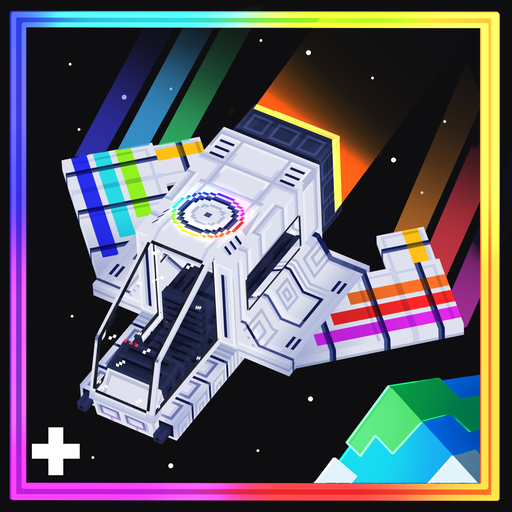
DedsafioStarships is a Fabric addon for Superb Warfare ReFabricated. It adds a vertical takeoff spacecraft with an automatic cockpit door, engine sounds, and a free third-person camera.
Install Ad Astra to travel between planets. The autopilot handles takeoff, the temporal jump, atmospheric approach, and landing. Orbital views, volumetric clouds, engine flames, and reentry effects accompany the flight.
Without Ad Astra, the ship still supports automatic vertical ascent to a configured altitude. Interplanetary routes and automatic planetary landings require Ad Astra.
Start here
- Read Installation for the required mods and versions.
- Follow Your First Flight to deploy and launch a ship.
- See Flight and Autopilot for the flight sequence and cabin behavior.
Server owners can enforce a destination and choose an arrival area through Server Configuration. Modpack authors can adjust flight parameters and orbital planet colors using the Datapack Reference.
This wiki documents the current Minecraft 1.21.1 build.
Installation
Use Minecraft 1.21.1, Fabric Loader 0.19.5 or later, and Java 21. Install the Fabric editions of the mods listed below.
Required mods
| Mod | Version used by this build |
|---|---|
| DedsafioStarships | 1.0.0 |
| Superb Warfare ReFabricated | 1.21.1-0.8.9.2 |
| Fabric API | 0.116.17+1.21.1 |
| Veil Lib | 4.5.2 |
| Forge Config API Port | 21.1.6 |
| Fabric Language Kotlin | 1.13.2+kotlin.2.1.20 |
| GeckoLib | 4.7.5 |
| Cloth Config API | 15.0.140+fabric |
| Trinkets | 3.10.0 |
The SBW version above is required by the addon. The other versions in the table are the project’s current dependency versions; this table does not claim compatibility with every newer release.
The published SBW JAR bundles additional libraries, including Cardinal Components, Extensible Enums, and ModernKeyBinding. Keep these bundled libraries in place.
Optional interplanetary travel
Install these mods to enable planetary destinations and the full autopilot sequence:
| Mod | Version used by this build |
|---|---|
| Ad Astra | 1.16.26 for Fabric 1.21.1 |
| Resourceful Lib | 3.0.12 |
| Resourceful Config | 3.0.11 |
| Common Storage Lib | 0.0.10 |
Ad Astra supplies the planets. DedsafioStarships supplies the ship’s flight sequence and visual transitions.
Installing on a client or server
- Create a Fabric instance for Minecraft 1.21.1 using Java 21.
- Put the addon and its required mods in the instance’s
mods/folder. - Add Ad Astra and its dependencies if you want interplanetary travel.
- Launch the instance to generate configuration files.
For multiplayer, install the addon and the same dependency set on the server and every joining client. An existing shader pack is not required for the flight effects; the addon renders them through Veil.
Your First Flight
Deploy the ship
Use the Starship vehicle container from SBW to place the ship on open ground. Leave room around the wings and above the cabin. The cockpit door starts open.
Operators can also spawn the entity with:
/summon dedsafiostarships:starship ~ ~ ~
The ship uses SBW’s energy system. Check that it has energy before trying to launch.
Board and launch
- Interact with the ship to board the pilot seat. The door closes automatically.
- Press an SBW vehicle movement control to start the engine. Forward, backward, ascend, or descend input can start it.
- Wait through ignition. The engine start sound, camera shake, and exhaust play before the ship begins its vertical ascent.
The ship uses SBW’s vehicle key bindings. Check Minecraft’s Controls menu if you have changed them or if another mod uses the same keys.
Choose a destination
With Ad Astra installed, launch from one of its supported surface worlds. The ship rises into the orbital view before opening the destination menu.
Choose a planet to begin the jump. Choose Return to the surface to land in the current world. Closing the menu also selects a return to the current surface.
If the server has enabled starshipFixedDestination, the autopilot chooses the server’s destination and skips free selection. Departing from that planet sends you back to Earth. See Server Configuration.
Let the autopilot land
Remain aboard while the ship completes its jump and descent. It rotates into its landing position, searches for clear ground, and brakes near touchdown. After landing, the engine stops and the door opens, even if you are still seated.
Release the movement controls after touchdown before starting another flight.
Flying without Ad Astra
The engine still starts normally and the ship ascends vertically to TakeoffAltitude, which defaults to Y=750. The destination menu and planetary landing sequence are unavailable. This altitude is a world Y coordinate, rather than a distance measured from the launch pad.
Flight and Autopilot
The full sequence requires Ad Astra and a launch world registered as a surface planet. The autopilot handles the ship’s movement throughout the route.
Flight sequence
| Stage | What happens |
|---|---|
| Takeoff | The engine ignites, the camera shakes, and the ship begins ascending vertically. |
| Atmospheric transit | The ship continues upward through the volumetric cloud layer. |
| Atmosphere exit | The orbital view appears and the ship rotates for travel. |
| Destination selection | You select a planet, or the server chooses its configured destination. |
| Temporal jump | The jump effects start and the destination planet gradually grows in view. The server prepares the landing area. |
| Stabilization | Jump effects stop and the destination’s orbital view remains visible. |
| Approach | The ship automatically rotates into its vertical landing orientation. |
| Landing | The ship descends through clouds, enters the destination world, and brakes above safe ground. |
| Landed | The engine stops and the cockpit door opens. |
At the default settings, clouds start during ascent at Y=300. Their upper opening reveals the orbital view as the ship reaches space. Takeoff exhaust switches off in the orbital stages.
During descent, a heat shield effect forms beneath the ship. Close to the ground, the engine produces a landing burn and a smaller camera shake.
Cameras and cabin
The pilot’s seat follows the vertical rocket orientation. First-person view uses the cockpit camera, while third-person view supports SBW’s free camera. Use Minecraft’s perspective control and SBW’s camera controls to change your view.
The door opens when the ship is placed, closes when the pilot boards, and opens after an automatic landing. It also opens when the pilot seat is empty.
While aboard a healthy Starship, Ad Astra’s oxygen, temperature, and acid-rain checks protect the passenger. That protection ends when you leave the ship. Bring the equipment required by your destination before disembarking.
Destinations and landing sites
The destination menu lists available Ad Astra surface planets within the ship’s PlanetTier. The default tier is 4. Ad Astra’s disabled-planet settings also affect which destinations are available.
Normal travel uses Ad Astra’s arrival location as the preferred landing area. A fixed server route uses the configured X/Z area instead. The autopilot searches nearby for solid ground and enough clearance for the ship, and avoids landing inside another Starship.
The orbital planet view is a procedural visual configured by datapacks. It is not a live map of the terrain below.
Terrain transfer
The server prepares destination chunks during the jump. The actual dimension transfer happens during descent, inside the cloud layer, at Y=591 by default. The addon keeps the flight view visible through the transfer and suppresses the normal terrain-loading screen for this sequence.
See Datapack Reference before changing the cloud or transfer altitudes. Their overlap conceals the change between the orbital view and the destination terrain.
Server Configuration
Server settings use Forge Config API Port. The destination restriction is a Minecraft gamerule, so it can be enabled or disabled separately from the configured route.
Restrict destination selection
Enable the fixed route with:
/gamerule starshipFixedDestination true
The rule defaults to false. When enabled, the ship chooses the configured destination automatically after reaching orbit. Players cannot override it with a destination selection packet.
To allow free selection again:
/gamerule starshipFixedDestination false
Configure the route
Launch the world or server once to generate dedsafiostarships-server.toml. Stop the world or server before editing it, then restart to apply your settings. Use the file generated by Forge Config API Port for that instance; the development instance stores it under config/.
The default configuration is:
[autopilot]
destination = "ad_astra:moon"
arrivalX = 0
arrivalZ = 0
arrivalSpread = 64
| Setting | Meaning |
|---|---|
destination | Ad Astra surface dimension used by the fixed route. |
arrivalX | Center X coordinate of the preferred arrival area. |
arrivalZ | Center Z coordinate of the preferred arrival area. |
arrivalSpread | Radius, in blocks, for the random arrival offset. Allowed range: 0 to 4096. |
The server determines landing Y from the terrain. Do not add a Y setting.
arrivalX and arrivalZ each accept values between -29,999,000 and 29,999,000. The landing area must also fit inside the destination world’s border.
For example, to send ships toward an area on Mars:
[autopilot]
destination = "ad_astra:mars"
arrivalX = 1200
arrivalZ = -800
arrivalSpread = 96
Each flight chooses a random point within that radius. The safe landing search can move the final position nearby, so the radius is not a strict boundary for touchdown. Random offsets reduce clustering; they do not reserve a unique landing pad for every ship.
The safe landing search radius is a separate datapack setting, LandingSearchRadius. See Datapack Reference.
Return to Earth
With the rule enabled, departing from the configured planet sends the ship to Earth (minecraft:overworld). The return area follows Ad Astra’s recorded arrival information, with arrivalSpread applied around it.
For the default route, this produces:
Earth -> Moon -> Earth
The configured arrivalX and arrivalZ apply to the selected planet, rather than replacing the Earth return coordinates.
Unavailable destinations
The configured dimension must exist, be an available Ad Astra surface destination, and be within the ship’s tier. If it is unavailable, the ship stays in orbit and reports an error. It does not fall back to unrestricted destination selection.
Datapack Reference
The ship’s vehicle definition uses SBW’s datapack system. DedsafioStarships reads its additional flight fields from the same EngineInfo object using SBW’s JSON reader. Planet appearances use separate files under starship_planets/.
Create a pack
For Minecraft 1.21.1, use data pack format 48. A pack that overrides the ship and Earth’s orbital appearance has this structure:
starship-settings/
  pack.mcmeta
  data/
    dedsafiostarships/
      sbw/
        vehicles/
          starship.json
      starship_planets/
        earth.json
Create pack.mcmeta at the pack’s root:
{
  "pack": {
    "pack_format": 48,
    "description": "Starship flight settings"
  }
}
Place the folder in the world’s datapacks/ directory. Run /reload and use /datapack list to confirm the pack is enabled. Start a new flight after changing settings; avoid reloading flight data midway through a trip.
Override the vehicle
Copy the addon’s full vehicle definition into your pack at:
data/dedsafiostarships/sbw/vehicles/starship.json
The original is included at that path inside the mod JAR. In the project, it is under src/main/resources/.
Keep the rest of the copied definition, including seats, collision boxes, and engine type. Edit the fields you need inside EngineInfo. An EngineInfo fragment by itself is not a complete vehicle definition.
Flight fields
JSON field names are case-sensitive. Durations use game ticks, with 20 ticks per second at the normal server tick rate. Speeds use blocks per second. Altitudes use world Y coordinates.
EngineInfo field | Default | Meaning |
|---|---|---|
TakeoffAltitude | 750 | Target ascent altitude. Planetary flights also enforce a minimum of 128 blocks above the world’s build height. |
TakeoffSpeed | 10 | Vertical ascent speed. |
IgnitionTicks | 40 | Ignition delay before ascent, including the initial camera shake. |
OrbitRevealTicks | 100 | Duration of the transition into the orbital travel orientation. |
JumpTicks | 240 | Minimum jump duration. The jump can wait longer for destination terrain. |
StabilizationTicks | 80 | Pause in the destination’s orbital view after the jump. |
ApproachTicks | 120 | Duration of the rotation into landing orientation. |
LandingSpeed | 10 | Maximum vertical descent speed; the ship slows near touchdown. |
LandingSearchRadius | 32 | Search distance around the preferred arrival point. The landing search clamps this to 8 through 64 blocks. |
TerrainEntryAltitude | 591 | Descent altitude for the actual destination-world transfer, with a minimum of 128 blocks above the landing surface. |
CloudStartAltitude | 300 | Lower cloud-layer reference during ascent. |
CloudFadeOutAltitude | 580 | Altitude where the cloud opening begins during ascent. |
CloudFadeOutEndAltitude | 620 | Upper reference for the cloud transition. The departure opening continues above it. |
PlanetTier | 4 | Highest Ad Astra planet tier the ship can select. |
EngineStartSound | "superbwarfare:a_10a_engine_start" | Sound played when the engine starts. |
For example, these values inside the existing EngineInfo object make ignition last three seconds and the jump last at least sixteen seconds:
"IgnitionTicks": 60,
"JumpTicks": 320
These two lines are an editing example, not a complete JSON file. Keep the surrounding object and all other vehicle settings.
Use finite numeric values, positive speeds and durations, and an ascending cloud range. Keep the terrain transfer inside the descent cloud layer if you want it concealed. Changing only the transfer altitude can expose the world change.
Other SBW vehicle settings
These fields are already present in the full vehicle definition:
| Field | Current value | Purpose |
|---|---|---|
MaxHealth | 500 | Vehicle health. |
MaxEnergy | 5000000 | Energy capacity. |
EngineInfo.EnergyCostRate | 128 | Engine energy cost per tick. |
EngineSound | "superbwarfare:a_10a_engine" | Running engine sound. |
AllowFreeCam | true | Enables SBW’s free camera behavior. |
DestroyInfo.ExplosionDamage | 800 | Destruction explosion damage. |
DestroyInfo.ExplosionRadius | 16 | Destruction explosion radius. |
The EngineType is AirShip. The automatic flight behavior is implemented by the addon around that engine.
Planet appearances
To change Earth’s orbital view, override:
data/dedsafiostarships/starship_planets/earth.json
The default file is:
{
  "dimension": "minecraft:overworld",
  "land_color": "83934b",
  "water_color": "165384",
  "atmosphere_color": "4d9be0",
  "sea_level": 0.48,
  "clouds": 0.5
}
| Field | Format | Purpose |
|---|---|---|
dimension | Namespaced dimension ID | The planet whose orbital appearance to change. |
land_color | Six-digit RGB hex string without # | Procedural land color. |
water_color | Six-digit RGB hex string without # | Procedural water color. |
atmosphere_color | Six-digit RGB hex string without # | Atmosphere color. |
sea_level | Number from 0 to 1 | Water threshold in the procedural planet view. Defaults to 0 if omitted. |
clouds | Number from 0 to 1 | Cloud coverage in the orbital planet view. Defaults to 0 if omitted. |
clouds controls the orbital planet’s appearance. The volumetric clouds around the ship use the EngineInfo altitude fields instead. These files do not change a world’s actual terrain, weather, or oceans.
The addon includes earth.json, moon.json, mars.json, venus.json, mercury.json, and glacio.json. Override the existing file for the planet you want to change. Adding an appearance file does not register a new Ad Astra destination.
Troubleshooting
Fabric reports missing or incompatible mods
Check the Installation tables and use the Fabric 1.21.1 editions. The addon requires SBW 1.21.1-0.8.9.2 and Java 21.
If Fabric reports missing extensibleenums, mkb, or Cardinal Components, check that you installed the full published SBW JAR. These libraries are bundled in that release. A development classpath and a normal launcher installation can resolve nested libraries differently.
The ship does not launch
Board the pilot seat, check the ship’s energy and health, and press an SBW vehicle movement control. The default ignition delay is two seconds. Check the Controls menu for conflicting key bindings if the engine does not respond.
After an automatic landing, release the movement controls before pressing one again to restart.
The ship rises but no destination menu appears
The planetary sequence requires Ad Astra. It also requires a launch dimension registered by Ad Astra as a surface planet. Without those conditions, the ship uses its vertical ascent behavior.
If starshipFixedDestination is enabled, the absence of a selection menu is expected: the server chooses the destination. See Server Configuration.
A planet is missing from the menu
Check that its dimension exists on the server, that Ad Astra has not disabled it, and that its tier does not exceed the ship’s PlanetTier. Space dimensions are not offered as surface landing destinations.
The ship reports an unavailable configured destination
Check destination in dedsafiostarships-server.toml. It must name an available Ad Astra surface dimension within the ship’s tier. The default is ad_astra:moon.
When a fixed route is invalid, the ship remains in orbit instead of allowing a different destination.
No safe landing site was found
The search needs a solid, dry 3-by-3 ground area with no leaves beneath the landing point, plus an unobstructed area about 10 blocks wide and 7 blocks tall. It also checks the world border and nearby Starships.
Move the configured arrival center to more open ground, or adjust LandingSearchRadius within its supported range. Dense buildings, oceans, steep terrain, and occupied landing areas can prevent a safe arrival.
The jump waits longer than expected
JumpTicks is a minimum duration. The server waits for destination chunks before proceeding. If preparation fails, the ship reports an error and remains in orbit.
Check the server log and the availability of the destination world. Newly generated terrain can take longer to prepare than an area that already exists.
Flight effects are missing or a shader fails to load
Confirm that Veil Lib 4.5.2 is installed. Check logs/latest.log for shader compilation or resource-loading errors. If you use other rendering mods or shader packs, include their names and versions when reporting the issue.
A datapack change does not appear
Check /datapack list, run /reload, and inspect the log for JSON errors. Match the file path, namespace, and field capitalization shown in Datapack Reference. Keep the full vehicle definition when overriding starship.json.
Start a new flight to assess changed timing or altitude settings.
Reporting a problem
Include Minecraft, Fabric Loader, SBW, Veil, Ad Astra, and addon versions, along with logs/latest.log and any crash report. Describe the launch dimension, selected destination, flight stage, and relevant datapack or server settings. For visual issues, include the camera perspective and a screenshot or short recording.